Tesla Software V10.2 (2020.48 December 2020) Update

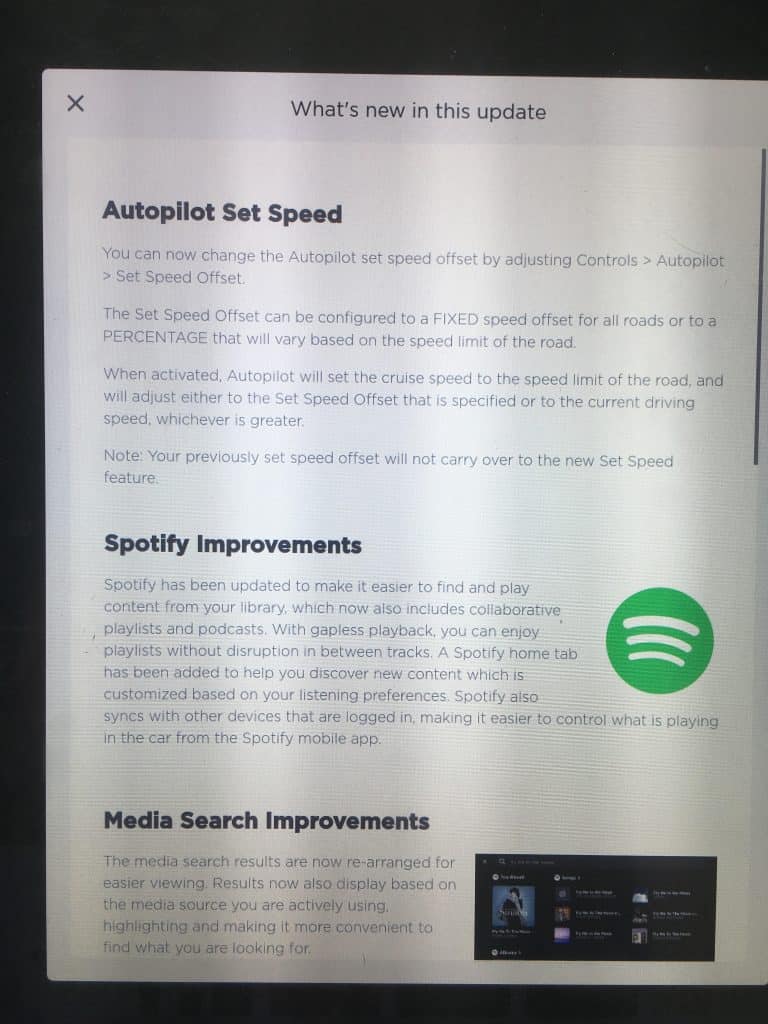
Tesla software v10.2 has been pushed out! This is the latest over-the-air software update. New games and improvements in a few other areas round out the main software updates found in Tesla’s 2020.48 release. It sounds like Tesla originally was aiming to have this released before Christmas, but it came a day later and with some of the features pushed out for a later date. Let’s dive in… New Tesla Games As in previous releases, the Tesla games can be found in the Entertainment/Arcade section. The games that have been added to the Tesla Arcade are The Battle of Polytopia, Cat Quest, and Solitaire. The Battle of Polytopia This is a strategy game with low poly graphics in which users take turns. The goal is to lead your civilization to victory by expanding your empire while researching new technologies. I never heard of this game before, but according to the release notes it has won some awards. You can also play online by creating a Tesla game profile. You’ll also see the option to play offline if you prefer. This appears to be the first Tesla Arcade game that will use a leaderboard, assuming you play online. Cat Quest This is another game I wasn’t aware of (but that’s not saying much). The Release Notes mentions that Cat Quest is an adventure game with dragons, magic, and cats. The goal of the game is to rescue your catnapped sister from the evil Drakoth. Gameplay includes an overworld map to help you navigate as you explore dungeons for loot, and help various characters in several side quests. Cat Quest does require you to connect a USB game controller to play. Solitaire So I am familiar with this one, as I’m sure most people are. Apparently it is also known as Klondike to some. The classic card game that can be found in digital format on Microsoft Windows has now landed in the Tesla Arcade. In this Tesla version you can choose one of three modes. Draw 1, Draw 3, or Vegas play mode. You can also customize the backdrop and card backs. Driving Visualization Improvements In the Release Notes it mentions the instrument cluster has been refreshed (this will apply to the Model S and X, although the Model 3/Y have also had a UI update). The Autopilot availability and detected speed limit are now displayed next to the driving speed. It also mentions that select items have slightly moved, but will continue to look and behave the same as before. I noticed several items are small now, it looks similar to if you change your computer monitor to a higher resolution. Everything gets slightly smaller. I also noticed the “D” for drive changes to a blue color when Autopilot is engaged. I’m not sure if I agree with the color choice as at a quick glance you might think your high beams were on, but this is in a completely different location at the bottom of the screen. Scheduled Departure Improvements A couple of nice updates here. Scheduled Departure can now precondition the battery and cabin even when your vehicle is unplugged. To account for different utility rate plans, you are now able to set the time when your off-peak rates end to help you save on charging costs. We don’t have off-peak rates where we’re located, but for those that do this feature will help you save a bit of coin on charging. To access this feature, tap on Schedule from the climate control or charging panel when your vehicle is parked. Supercharger Display Improvements With this update the Supercharger pins on the touchscreen will now display the number of available stalls at Supercharger location. A number now displays inside of the red pin. This will especially help if you’re choosing between one of a couple locations based on how many people are currently using them. The number available might not be as important as how many there are total in the case of power sharing on version 1 and 2 Superchargers. It won’t matter on with Version 3 Superchargers since they have dedicated power. You can also search for nearby amenities by tapping an amenity icon on the Supercharger popup display. By tapping on an icon for restroom, food, lodging, or WiFi, you’ll get a navigation search for the specific amenity. It seems even if there is not one of the amenities nearby, it will still allow you to click on it which will then show “no results”. This is one in a future update it would be nice to see the icon greyed out showing there is no nearby amenities for that particular selection. Vehicle Information This one also pertains to the Tesla “T” which was removed. To access information such as your VIN, model, odometer, naming of your vehicle, and packages you’ve purchased (such as Full Self Driving and Standard or Premium Connectivity), you’ll now go into Controls / Software. Release Notes Improvements The Tesla “T” at the top of the touchscreen has now been removed. Previously, you could click here to access the Tesla “Easter Eggs” and software Release Notes. Now, the Release Notes can be found by clicking on Controls / Software / Release Notes. They’ve also improved the browsing of Release Notes by adding a left-hand navigation. Tesla Model 3/Y Updates A few specific updates for the Model 3 and Y have also been released. There’s now a Boombox feature, updated UI including illustrated vehicle animation. Boombox The Model 3 and Y also received some specific features including the new Boom Box feature which allows use of the external speaker. The release notes mention you can entertain a crowd with your media player when parked. It also states you can adjust the sounds your car makes, but to check local laws before use in public spaces. It mentions adding up to 5 custom sounds which can be done by connecting a USB with a directory named Boombox. I could see owners added
Tesla Software V10.2 (2020.48 December 2020) Update Read More »